Merge fields & Twig syntax
Anywhere you can type text that ends up on the PDF — Text components, HTML Text components, translation strings, the Details Box, image link URLs, QR code contents — you can include merge fields. These are placeholders that get replaced with real invoice, client, or company data at render time.
BestPDF uses Twig under the hood, which means you can do more than just drop in a value: you can format it, run conditional logic, and loop over lists.
The simple case: dropping in a value
Wrap a field name in double curly braces:
Invoice {{ invoice.num }} — total {{ invoice.total }}
In the editor, you don't have to type those names from memory: every text field has a green + Translation dropdown and a blue + Merge Field dropdown that insert the correct syntax for you.
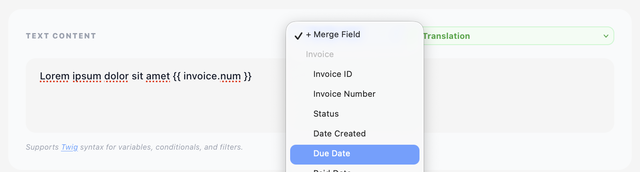
Available fields
An invoice design exposes the invoice.* group; a quote design exposes quote.* instead. The client.* and company.* groups are available in both. The + Merge Field dropdown only ever offers you the group that applies to the design you're editing.
Invoice (invoice designs only)
| Field | What it is |
|---|---|
invoice.id | Internal ID |
invoice.num | Invoice number (the one shown to the client) |
invoice.status | paid, unpaid, cancelled, draft, etc. |
invoice.date_created | Issue date, formatted per the date format setting |
invoice.date_due | Due date |
invoice.date_paid | Payment date (empty if unpaid) |
invoice.subtotal | Subtotal, formatted with currency |
invoice.tax | Total tax amount, formatted with currency |
invoice.tax_rate | The tax rate applied, formatted |
invoice.total | Total, formatted with currency |
invoice.credit | Credit applied to this invoice |
invoice.paid | Amount already paid |
invoice.balance | Outstanding balance |
invoice.credit_balance | The client's remaining credit balance |
invoice.account_balance | The client's running account balance |
invoice.notes | Free-text notes attached to the invoice |
invoice.payment_method | Payment method name |
invoice.view_url | Direct link to this invoice in the client area |
invoice.eu_reverse_charge | Boolean — true when EU reverse charge applies (see below) |
invoice.overdue | Overdue reminder level, 0–3 (see below) |
Quote (quote designs only)
| Field | What it is |
|---|---|
quote.id | Internal ID |
quote.num | Quote number |
quote.subject | The quote's subject line |
quote.proposal | Proposal body text — see the note below |
quote.status | The quote's current stage |
quote.date_created | Issue date |
quote.valid_until | Expiry date |
quote.subtotal | Subtotal, formatted with currency |
quote.total | Total, formatted with currency |
Client
| Field | What it is |
|---|---|
client.id | Client ID |
client.name | Full name (first + last) |
client.firstname | First name |
client.lastname | Last name |
client.company | Company name |
client.email | Email address |
client.address1, client.address2 | Address lines |
client.city, client.state, client.postcode, client.country | Address parts |
client.country_code | Country as a two-letter ISO code (CH, DE, …) |
client.tax_id | VAT / tax number |
client.area_url | Link to the client area login page |
client.group_id | The client group's ID |
client.group_name | The client group's name |
client.signup_date | When the client signed up, formatted |
client.custom_fields['…'] | A client custom field, by name |
Company
| Field | What it is |
|---|---|
company.name | Your company name |
company.address | Your company address, with the line breaks you configured (see below) |
company.url | Your website |
company.country | Your country |
company.country_code | Your country as a two-letter ISO code |
company.tax_code | Your own tax / VAT number |
company.tax_id_label | The label Blesta uses for a tax number, in the document's language |
System
| Field | What it is |
|---|---|
system.url | The URL of your Blesta installation |
system.link | The same URL wrapped in an <a href> — for HTML Text blocks |
Client custom fields
Custom fields are keyed by their name, not by an internal id, so a template reads the way the admin area does:
{{ client.custom_fields['VAT Number'] }}
The name is the one shown in Blesta's client custom-field settings. A name that doesn't exist renders empty rather than failing, so a template stays safe when a field is removed.
The + Merge Field dropdown inserts client.custom_fields[''] with the quotes already in place — type the field name between them.
The overdue reminder level
invoice.overdue is 0 for an invoice that isn't overdue, and 1, 2 or 3 once the first, second or third reminder threshold has passed — the thresholds Blesta itself uses for overdue notices. It's the number to branch on when the wording should escalate:
{% if invoice.overdue > 0 %}
  {{ lang.overdueNotice[invoice.overdue] }} — {{ lang.overdueMessage[invoice.overdue] }}
{% endif %}
The built-in overdueNotice and overdueMessage strings are indexed by exactly this number, which is what makes the one-liner above work; edit their wording per level on the Translations tab.
Multi-line company address
company.address is printed with the line breaks you configured in Blesta rather than being flattened onto one line. In an HTML Text block, pipe it through nl2br to keep those breaks visible in the PDF:
{{ company.address|nl2br }}
In a plain Text component the breaks are honoured as they are.
EU reverse charge
invoice.eu_reverse_charge is a boolean, not a piece of text — it is true when the client is in an EU country other than your own and has a VAT number on file. Test it and print your own wording, or the built-in translated notice:
{% if invoice.eu_reverse_charge %}{{ lang.reversecharge }}{% endif %}
It also works as a condition on any component: the conditions evaluator casts it to 1 / empty, so is not empty means "reverse charge applies". That's the tidy way to show a whole notice block only on reverse-charge invoices.
quote.proposal is offered on quote designs for compatibility with designs carried over from other installations. Blesta quotations carry no separate proposal body, so on Blesta the field currently resolves to empty — use quote.subject, or an HTML Text component, for the covering text.
Twig features you can use
The template engine runs in a sandbox — most Twig is available, but a few unsafe things (like calling arbitrary PHP) are blocked.
Tags
{% if … %} … {% else %} … {% endif %}— conditional rendering{% for item in list %} … {% endfor %}— loops{% set name = value %}— assign a local variable
Filters
Filters transform the value, written with a pipe: {{ value|filter }}.
| Filter | Purpose |
|---|---|
upper, lower, capitalize, title | Change case |
trim | Remove leading/trailing whitespace |
number_format(2, '.', ',') | Format a number with decimals / separators |
date('Y-m-d') | Format a date |
default('fallback') | Use a fallback when the value is empty |
length | Length of a string or list |
join(', ') | Join a list with a separator |
split(',') | Split a string into a list |
replace({'old':'new'}) | Find-and-replace |
nl2br | Convert newlines to <br> (HTML Text only) |
abs, round | Numeric helpers |
first, last, slice | List access |
escape, raw | Control HTML escaping |
Examples
Dear {{ client.firstname|default('customer') }},
{% if invoice.status == 'paid' %}
  Thank you for your payment.
{% else %}
  Please settle the outstanding balance of {{ invoice.balance }} by {{ invoice.date_due }}.
{% endif %}
{{ client.company|upper }}
Translation strings
Two families of translated text are available alongside the data fields, both offered by the green + Translation dropdown.
BestPDF strings — lang.*
Everything BestPDF prints itself: column headings, summary row labels, details-box labels, status names. Override the wording per language on the Translations tab, and add your own custom keys there too:
{{ lang.summary_balance }}
{{ lang.footer_disclaimer }}
Blesta's own strings — syslang.*
syslang reaches straight into Blesta's language files, so any string Blesta itself defines is available in the client's language:
{{ syslang.some_blesta_key }}
Replace some_blesta_key with the key you want. This is an escape hatch for wording you'd otherwise have to duplicate — most designs never need it.
Legacy syntax
If you're upgrading an older design (or pasting in examples from older docs), you may see the old {$field_name} or {field_name} syntax — for example {$invoice_num} instead of {{ invoice.num }}.
BestPDF still understands these forms and converts them on the fly. You don't have to migrate by hand, but new content should use the Twig syntax for clarity and to access filters and conditionals.
Errors
If your template has a syntax error, BestPDF won't break — it falls back to printing the original (unrendered) text. This makes broken merge fields easy to spot in the PDF: you'll see literal {{ something }} instead of the expected value.