Quote Items
The line items table for a quote. Nearly identical to Invoice Items, with two differences: a Discount column is available, and there is no item filter or custom-fields handling.
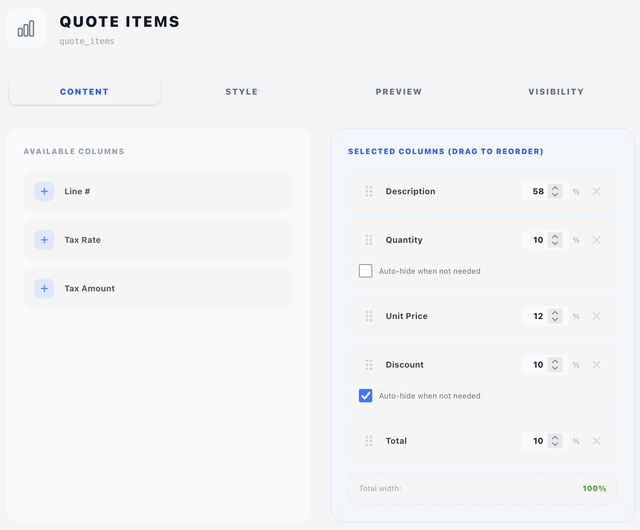
Content tab — columns
Same two-pane drag-and-drop interface as Invoice Items. Available columns:
| Column | Default width | Notes |
|---|---|---|
| Line # | 8% | Auto-numbered |
| Quantity | 10% | Printed as Qty. Has an Auto-hide option |
| Description | 34% | |
| Unit Price | 12% | |
| Discount | 10% | Has Auto-hide option — hides when no line has a discount |
| Tax Rate | 8% | |
| Tax Amount | 8% | |
| Total | 10% |
Width counter at the bottom turns green at 100%.
Style tab
- Table style — pick a table style (see Concepts → Styles).
- Show table header — print the column header row. Turn it off for a body-only table.
Description filter
A single regular-expression filter sits below the display options. Text matching the pattern is stripped from within item descriptions, leaving the item itself in place — for instance /\(Renewal\)/ to take a repeated suffix off every line. Any line the pattern empties is removed along with it, so a pattern written to clear a whole line leaves no blank gap behind.
Quote Items has no item filter — that one is Invoice-Items-only.
How item titles and their description lines are styled comes from the table style's body zone (Typography — first line and Typography — subsequent lines) — see Styles → Body.
Layout tab
Quote Items is content-only, so the Layout tab carries an Offset (X/Y nudges from the natural flow position) and a Width. See Concepts → Positioning.
Preview tab
Live preview with sample quote data, including a discount column when selected.