Page Number
A page indicator — "Page 1 / 3" or any other format you compose. Typically placed at the bottom-centre or bottom-right as an overlay.
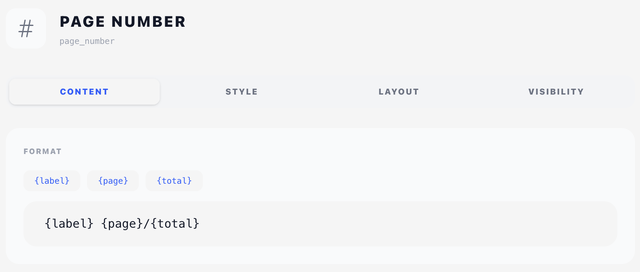
Content tab
Format
The text printed for the page number, with three placeholders:
| Placeholder | Replaced with |
|---|---|
{label} | The "Page" word from Translations (translated per client language) |
{page} | The current page number |
{total} | The total page count |
Click any of the placeholder chips above the input to append it to the current format. Defaults to {label} {page}/{total} — e.g. Page 1/3.
Other useful patterns:
{page} / {total}— minimal, no "Page" prefix{label} {page} of {total}— verbose— {page} —— symmetric pure number
Style tab
Typography
Standard typography style selector — see Concepts → Styles.
Force Centering
A toggle to centre the rendered string within the page width. Use this for a footer page number that should sit dead-centre regardless of the X position. When off, the string is aligned to the X coordinate from the Layout tab.
Layout tab
Position in mm — see Concepts → Positioning. When Force Centering is on, the X coordinate is ignored.
A Width mode sits below it — Edge to edge, Full width or Custom. A page number tucked into the bottom margin is already past the right margin, so Full width does nothing there and the number keeps the paper; give it Custom if you want to right-align it within a box of a known size.
Visibility tab
The Display selector here is restricted — only On first page only or On all pages (no "last page only"). The "last page only" option doesn't make sense for a page indicator.