E-Invoicing
Embeds machine-readable e-invoicing XML into the PDF — UBL, ZUGFeRD, Factur-X, and similar standards. The PDF stays human-readable; the embedded XML is what tax authorities and B2B systems parse.
Requires the Billing Booster Blesta plugin to be installed and configured. E-Invoicing is unusual in that it doesn't render anything visible — it just attaches XML to the PDF file.
When Billing Booster is not installed
If the addon isn't detected, the Content tab shows a "Billing Booster Not Detected" message and a pointer to the Integrations tab. The component will not embed anything until Billing Booster is installed.
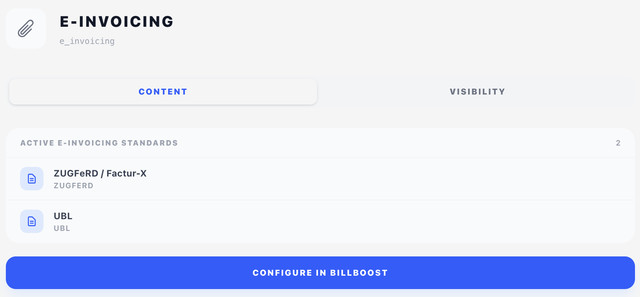
Content tab — active standards
A read-only list of e-invoicing standards configured in Billing Booster. Each row shows the standard's name and identifier.
Configuration of the actual standards — what fields are mapped, which level of compliance, issuer party details — happens inside Billing Booster. Click Configure in BillBoost at the bottom to jump there.
Visibility tab
See Concepts → Visibility & conditions. Useful for conditionally embedding e-invoicing only for B2B clients, or only for invoices to specific countries.
How it appears in the PDF
The XML is attached to the PDF using the standard's required mechanism (typically a PDF/A-3 file attachment with the prescribed filename and relationship). It is not visible in the printed document — to verify it's there, open the PDF in a viewer that lists attachments (Acrobat, most modern viewers under File → Attachments) or feed it to your invoicing system.
Because the attachment is invisible, the PDF will look identical with or without this component. The presence of E-Invoicing in the design is what tells BestPDF to invoke Billing Booster's XML generator at render time.
In a design preview no XML is attached: a preview renders from sample data rather than a real invoice, so there is nothing to generate an e-invoice from. The component reports itself as present whenever e-invoicing is configured in Billing Booster, which is what keeps anything linked to its visibility on the page — but preview.pdf never carries a customer's XML.
Tips
- Place E-Invoicing once per design. Adding it twice doesn't double-embed; the engine will only attach each standard's XML once.
- The standard often dictates that the PDF must conform to PDF/A-3. Billing Booster's configuration handles that — make sure the chosen standard's compliance level matches your delivery requirements.
- For Factur-X / ZUGFeRD specifically, pair this component with a Payment Code that includes EPC-QR if you also want a scannable visual payment indicator.